
Threads Image Downloader
Discover the fastest and easiest way to download Threads videos, photos, and GIFs online with our free Threads Downloader. This simple, user-friendly tool lets you save any Threads content in high-quality MP4 or JPEG format instantly—no app, no login, just one click for a smooth and secure download experience.
Supported Platforms:




Download Threads Images Online
Explore Threads Image Downloader, an online platform designed for downloading and archiving Threads app videos, GIFs, and images into your device in either JPEG or MP4 format. This resource enables you to securely save Threads media directly to your mobile device or computer, allowing convenient offline access.
Key Features of Threads Downloader
- Experience optimal functionality with minimal downtime, making it the most reliable Threads downloader available.
- Supports a variety of content types, including single-image Thread posts, multi-image Thread posts, videos, GIFs, and nested posts containing multiple images.
- Eliminate the need for downloading software or unfamiliar Apk applications, aligning with our shared dislike for unnecessary tools. Compatible across all devices—Windows, Mac, Android, and iOS.
- Completely free to use, this tool operates at impressive speeds, ensuring high-quality video and image rendering directly from official servers.
How to download Threads videos and photos?
- Launch the Threads app on your phone or visit the Threads.net website.
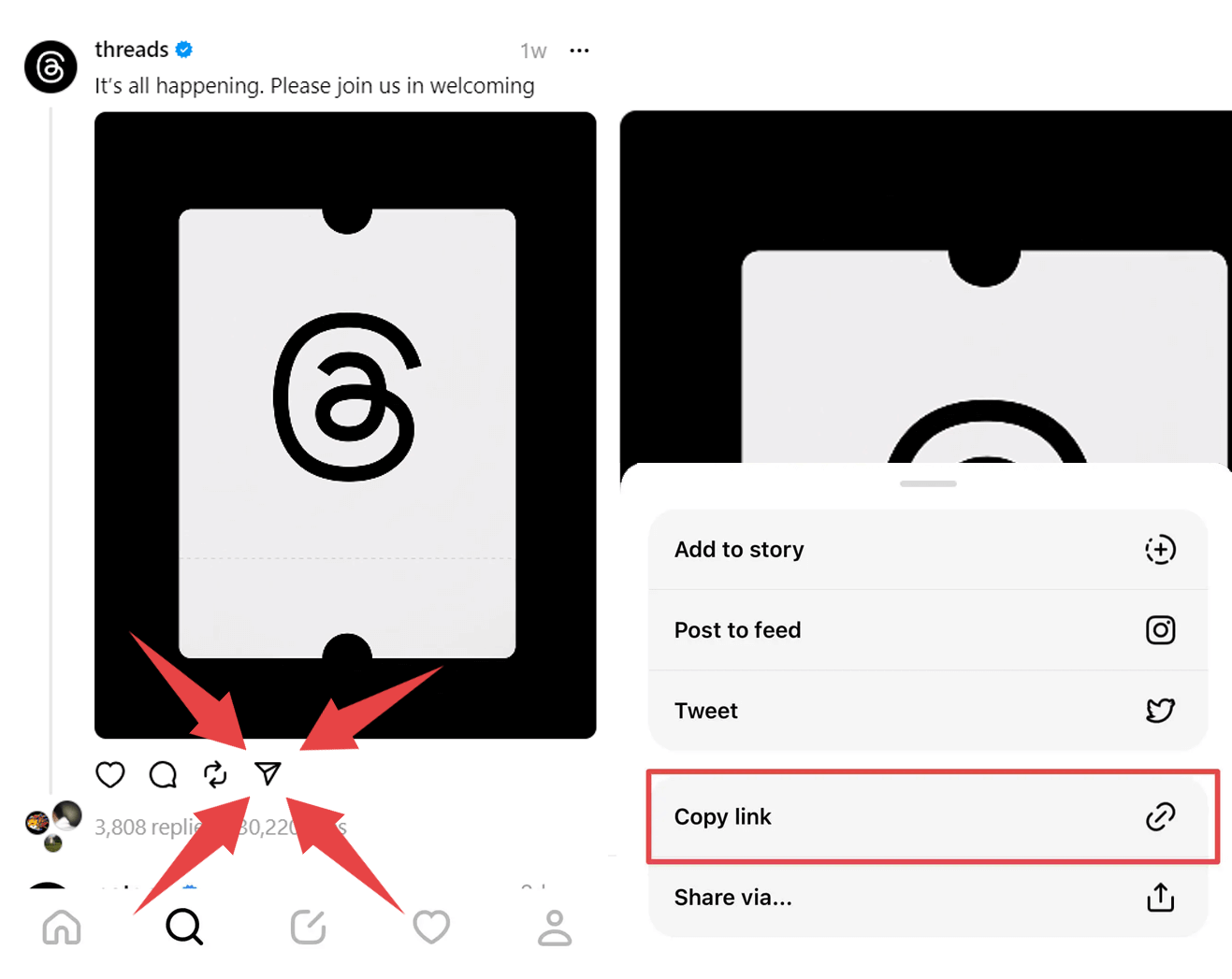
- Locate the content you wish to download and click on the share icon above the post. Then, choose “Copy Link”.
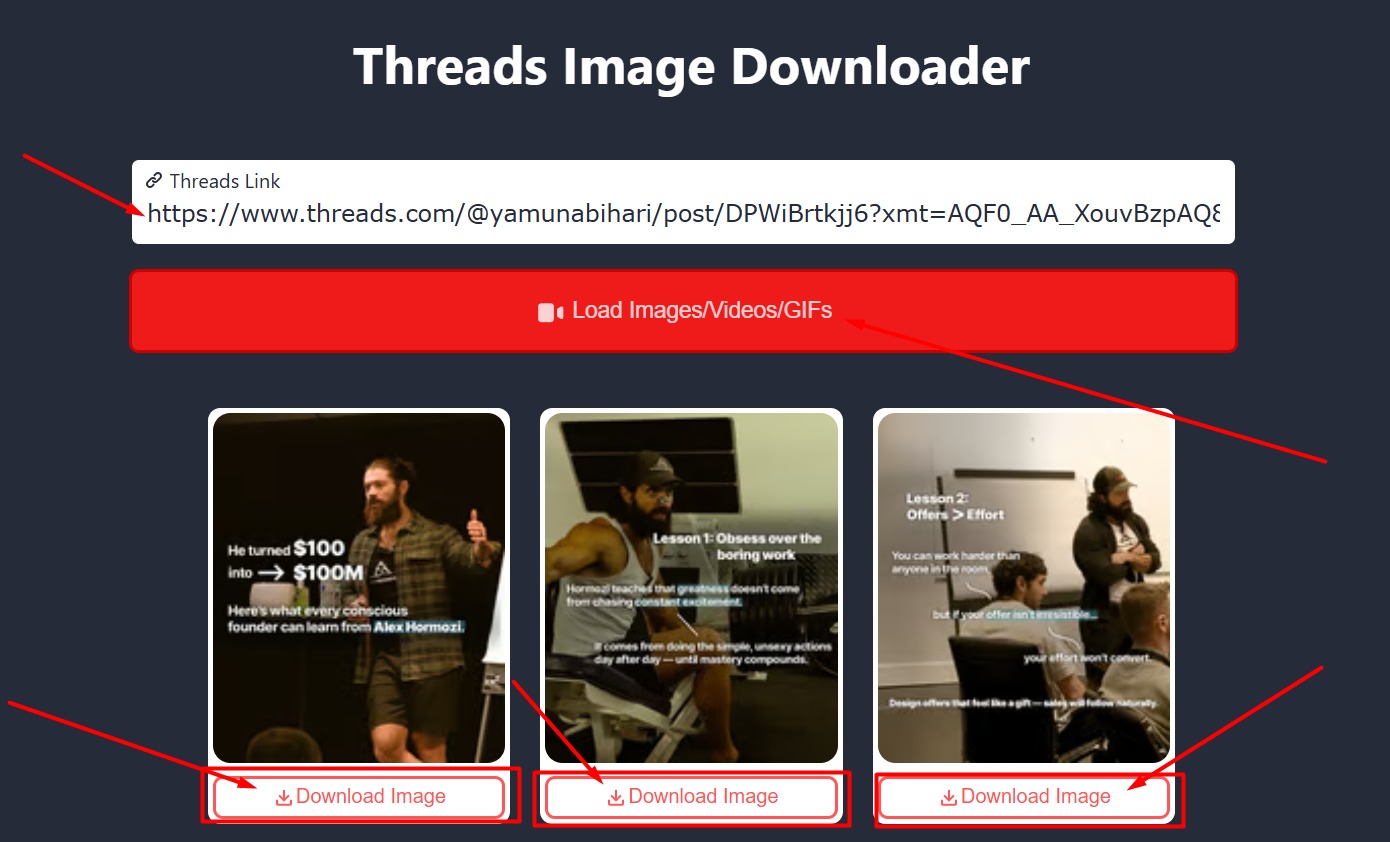
- Visit Threads Image Downloader, paste the copied Threads link into the input box, and click on “Download”.
- The desired video/gif/image will appear; click “Download” to save it to your device.
FAQ
What is the purpose of this page?
This tool enables you to download any video, image/photo, or GIF from Threads directly to your device with just a single click. Threads Video Downloader is a free Threads downloader with ultra-fast download speed. It works with any video from the all-new social media app by Instagram known as Threads. All videos are downloaded as an MP4 in HD, ensuring high-quality playback.
What are the steps to utilize this tool?
- Input the link/URL of the Thread you want to download into the designated field.
- Click the "Load Videos" button.
- Choose the desired quality option.
- Click the "Download" button.
The video will be saved to your device in MP4 format. Essentially, this tool serves as a Threads to MP4 converter, allowing you to convert any thread into an MP4 file. It's an all-in-one Threads video downloader.
What is the typical duration for downloading a video?
The time taken to download a video varies based on your internet connection and the video's size. However, our efficient Threads video downloader aims to ensure a relatively quick download process under optimal conditions.
Is it possible to use this tool to download a Threads GIF?
Absolutely! Threads Downloader supports GIFs, allowing you to download any GIF from Threads. Follow these steps:
- Enter the post link into the designated field.
- Click the "Load Videos" button.
- Choose your preferred quality for the GIF.
- Click "Download".
Remember, this tool lets you save any photo, video, or GIF as an MP4 or JPEG file.
What are the steps to save videos from Threads on both iOS and Android devices?
- Visit Threads Image Downloader on your iPhone, iPad, Android device, or any other platform.
- If you have the Threads app on iOS or Android, copy the link of the post you want to download.
- Paste the post link into the provided field on Threads Image Downloader.
- Click the relevant buttons to load the content and choose the quality.
- Finally, hit the "Download" button to save the video to your device.
Threads Downloader works across various devices and platforms, including iOS, Android, Windows, Mac, and Linux, allowing you to download Threads videos or images smoothly.
Is it secure to download image from Threads?
Yes, using Threads Image Downloader to download videos or GIFs ensures safety and security. We prioritize user privacy and do not retain any personal information. Additionally, all download links originate directly from Threads, ensuring a secure downloading experience.
Is it possible to save images from private accounts?
No, it is not possible to download images from private accounts on Threads. This restriction is in place to uphold the privacy settings chosen by users who have opted to keep their profiles and content private. However, Threads Downloader can be used to download image or videos from public accounts that do not have privacy restrictions. Respecting user privacy and platform policies is essential when using such tools.
Is downloading videos from Threads in accordance with legal regulations?
Downloading videos from Threads for personal use is generally considered legal. However, it's crucial to respect copyright laws and terms of service. Ensure that you don't distribute, reproduce, or monetize the downloaded content without proper permission from the owner. If you decide to share or use the content in any way, it's essential to provide proper credit to the original creator. Always be mindful of the terms of use and copyright regulations when downloading and using online content.
What are the methods for downloading High-Quality videos from Threads?
To download high-quality Threads videos, Threads Video Downloader enables you to acquire videos in their original resolution as uploaded on the Threads app. Once you input the post link and hit "Load Videos," various quality alternatives will appear for your selection. Select the highest quality offered to get the video in its top resolution.
What are the steps for saving videos from Threads?
- Copy the link of the thread containing the video you wish to save.
- Visit Threads Image Downloader, the Threads video downloader.
- Paste the post link into the "Thread Link" field.
- Click "Load Videos".
- Choose your preferred quality and click the "Download" button.
- For iOS users: A share menu will appear; select "Save Video" to store it in your camera roll. For Android users, the video will be saved automatically in their device files.